Saturday, May 18, 2013

Error: "The published message could not be routed because no subscribers were found."


I am getting the error "The published message could not be routed because no subscribers were found." as shown below. Do you have any idea how I can get rid of it?


 As this error is stating that  "the subscribing orchestration or send port has not been enlisted, or if some of the message properties necessary for subscription evaluation have not been promoted." Let  trouble shoot this error by using the BizTalk Administration console. 

First check the properties in the context of message and verify if you can see the desired properties promoted.


hmmm ok I am opening the routing failure reports:

 
I can see the property 'Customer' is promoted in the context of message.

 
 Then the second step would be to check the subscription. Let me check the Activation Subscription:


I can't see any subscription. Have you forgot to enlist the Send Port/Orchestration.


check... forget to start the send port.

Then start it and resume the message again.
 I have started it and resuming the message.


still getting the same error

check the Activation Subscription details.


I can see that you have specified the wrong name in send port subscription. It is showing as "ab" and based on the value of property Customer in the context of the message I think it should be "abc". Correct it in send port filter and resume the message.


Ah!! at last it worked !!!

Tuesday, May 14, 2013

BizTalk–Looping through repeating message nodes in orchestrations


Say that you have an incoming BizTalk message with many repeating nodes, and you want to process each one the same. The easiest thing to do would be to use the envelope to split the single message into multiple messages, then have multiple instances of your orchestration handle each one (similar to how the HIPAA “multiple” message schemas work). But what if you need to do some work after every individual message has been processed? I’ll show you how to use the Loop functoid along with xpath queries to loop through the message.
In my case, I’m receiving a flat file where each line is a response to a transaction we have submitted. After mapping the flat file to xml, I get something like this:
<Response>
   <Record>
      <RecordId>xxx</RecordId>
      <SubmitterId>xxx</SubmitterId>
      <Status>xxx</Status>
   </Record>
   <Record>
      <RecordId>xxx</RecordId>
      <SubmitterId>xxx</SubmitterId>
      <Status>xxx</Status>
   </Record>
</Response>
I want to insert each Record into the database, then do some work once they’ve all been inserted.
The first step is to create the single Record version of the message. It’ll be basically the same as the incoming Response message, just without the Response node at the top:
<Record>
   <RecordId>xxx</RecordId>
   <SubmitterId>xxx</SubmitterId>
   <Status>xxx</Status>
</Record>
The schema needs to be created without a Target Namespace; you’ll see why later.
Next, create the orchestration, two messages:
  • FullResponse (using the full flat file schema)
  • SingleResponse (using the new single Record schema)
…and three variables:
  • counter - int
  • counterString – string
  • responseCount - int
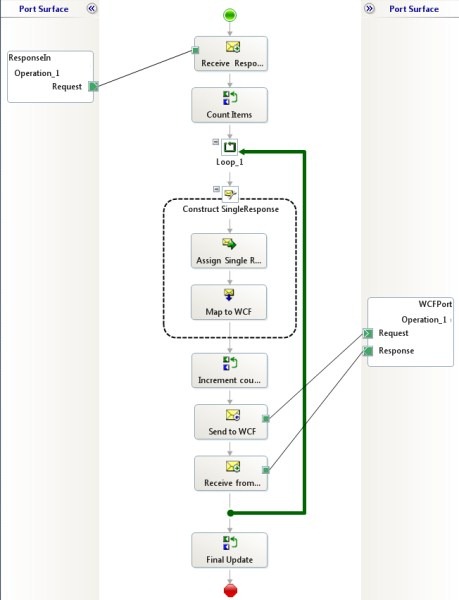
Drag various shapes onto your orchestration until you wind up with something that look like this:
LoopingPost
I’ll start at the top and detail how each shape should be configured.
Receive – receives FullResponse message
Expression - here you’re going to use an xpath query to count how many Record nodes are in the FullResponse message:
responseCount = xpath(InstaMedResponse, "count(/*[local-name()='Response' and namespace-uri()='http://MyProject.Response_FF']/*[local-name()='Record' and namespace-uri()=''])");
counter = 1;
counterString = "1";
(Pay attention to the namespace, yours may be different)
Loop -  what’s the loop condition?
counter <= responseCount
Message Assignment – here we’re grabbing a single Record node and assigning it to the SingleResponse message:
SingleResponse = xpath(InstaMedResponse, "/*[local-name()='Response' and namespace-uri()='http://AnciPay.InstaMedResponse_FF']/*[local-name()='Record' and namespace-uri()=''][" + counterString + "]");
Remember how I said the new schema needs to be created without a target namespace? Your xpath query will return the Record node without a namespace. Also, we have to (unfortunately) use counterString rather than just counter.ToString(), otherwise BizTalk will complain about an xpath error.
Map – this one is optional for the demo; in my case I’m mapping it to the Request Side of a generated schema.
Expression – here we need to increment the counter:
counter = counter + 1;
counterString = counter.ToString();
Send & Receive -  I’m using a WCF port to save to a database (click here for a simple tutorial), but you could omit these steps if you want.
Expression – this can really be anything that you want to happen after every individual Record node has been processed – run a stored procedure, send email, whatever.
Compile, deploy and test. If you just drop the SingleResponse message to a send port (instead of the database), you should see your incoming message split into multiple messages.

Monday, May 6, 2013

BizTalk WCF OracleDB Adapter - 'invalid username/password' error

SqlPlus converts the username/password to upper case by default, while in the adapter, we don't convert them to upper case. Can you try specifying the username and/or password in upper case in the adapter and see if that works.

Wednesday, April 24, 2013

Calling a WCF-WSHttp service from SOAPUI


SOAPUI is a great free tool that helps you to frame up request messages generated based on a service’s metadata and use them to call on HTTP based SOAP services as well amongst other advanced features.
One of the most common questions I have been approached for recently is how to use SOAPUI to call on a WCF service with a WCF-WSHttp binding.  If you create a SOAPUI project based on your service’s WSDL and try running one of the requests without changing any of the advanced options then you will get an error message like the following – “The message with To ” cannot be processed at the receiver, due to an AddressFilter mismatch at the EndpointDispatcher.  Check that the sender and receiver’s EndpointAddresses agree.”  You would not face this problem with a default WCF-BasicHttp binding.
The reason for this is that the WCF-WSHttp binding makes use of WS-Addressing which is an advanced feature that allows for messages to be easily routed through firewalls and other intermediaries.  In order to support WS-Addressing you need to set a few advanced properties in SOAPUI which aren’t enabled by default when you generate your project from a WSDL.
The first thing you need to do is focus on your request message and click on the WS-A (at least that is what it is called in SOAPUI 3.6) tab as highlighted in the below screenshot.
You now need to ensure that you’ve checked the tickbox against Enable/Disable WS-A addressing, set the Must understand dropdown box value to True, and ticked the Add default wsa:To tickbox as highlighted in the below screenshot.
If you call on the service now that should work (assuming you don’t have any security turned on for the service, you might need to apply more advanced settings to enable this).
Do also note that if you choose to use Message based security and you enable the Establish Security Context tickbox (the below screenshot is from a BizTalk WCF-WSHttp send port) then you will always get a failure from SOAPUI like the following – “The message could not be processed. This is most likely because the action xxx is incorrect or because the message contains an invalid or expired security context token or because there is a mismatch between bindings. The security context token would be invalid if the service aborted the channel due to inactivity. To prevent the service from aborting idle sessions prematurely increase the Receive timeout on the service endpoint’s binding.”  This happens because SOAPUI doesn’t appear to support this setting, you will need to turn it off while you are testing from SOAPUI or use an alternative testing tool.

Monday, February 18, 2013

Is there a difference between “throw” and “throw ex”?


Throw: It propagates the full stack information to the caller,
                      When you use the throw with an empty parameter, you are re-throwing the last exception. Or rethrows the original exception and preserves its original stack trace.
Sample:


static void Main(string[] args)
{
  try
  {
     Method2();
  }
  catch (Exception ex)
  {
     Console.WriteLine(ex.StracTrace.ToString());
     Console.ReadLine();
  }
}

static void Method2()
{
  try
  {
     Method1();
  }
  catch (Exception ex)
  {
     throw;
  }
}

static void Method1()
{
  try
  {
     throw new Exception ("This is thrown from Method1");
  }
  catch (Exception ex)
  {
     throw;
  }
}

Throw ex:

Sample:


static void Main(string[] args)
{
  try
  {
     Method2();
  }
  catch (Exception ex)
  {
     Console.WriteLine(ex.StracTrace.ToString());
     Console.ReadLine();
  }
}

static void Method2()
{
  try
  {
     Method1();
  }
  catch (Exception ex)
  {
     throw ex;
  }
}

static void Method1()
{
  try
  {
     throw new Exception ("This is thrown from Method1");
  }
  catch (Exception ex)
  {
     throw;
  }
}


Summary:


Reference link : http://dotnetinterviewquestion.wordpress.com/2012/06/06/c-training-difference-between-throw-and-throw-ex/

Monday, December 10, 2012

BizTalk 2013 Intorduction

http://blogs.msdn.com/b/biztalk_server_team_blog/archive/2012/11/06/announcing-biztalk-server-2013-beta.aspx
http://biztalkadmin.com/biztalk-2013-sql-2012-and-server-2012/
http://www.zdnet.com/microsofts-biztalk-2013-enterprise-integration-server-hits-beta-7000007054/